Skip to content

Add Discophile - #10957

Open
probonopd wants to merge 1 commit into
masterfrom
discover/Discophile
Open

probonopd wants to merge 1 commit into
masterfrom
discover/Discophile

Conversation

@probonopd

Copy link
Copy Markdown
Member

Repository: https://github.com/debba/discophile

Your music server, played like a record collection. A desktop and web player for Navidrome, Subsonic, Jellyfin and Audiobookshelf, with synced lyrics, an equalizer and a music assistant.

  • Stars: 13
  • Release with the AppImage: v1.0.2 (2026-10-28T10:07:56Z)
  • AppImage asset: Discophile-1.0.2-x86_64.AppImage
  • License: MIT

Found by .github/workflows/discover-apps.yml, which looks for GitHub
repositories that publish AppImages but are not in the catalog yet. This
entry was not tested by a human; please review it before merging.

Discovered on GitHub as publishing AppImages on its releases, by
discover-apps.yml. Needs a maintainer's review.
@github-actions

Copy link
Copy Markdown
Contributor

✅ Test passed

@debba: this pull request adds the AppImage from your GitHub repository to the AppImage catalog; the test reports the following. Could you have a look?

Please check that the screenshot shows the application's main window.

Discophile

Discophile

Tested:

Compatibility: not self-contained: uses the C library of the system; references glibc 2.35

Warnings:

  • The window is mostly dark, so the application seems to start in a dark theme although the test system is not set to dark mode. Please use a light mode by default and use the dark theme only when the system is configured for dark mode (e.g. the GTK/Qt or theme setting) or the user chooses it in the settings.
  • The AppImage contains no update information, so users cannot update it with AppImageUpdate or similar tools. Please consider embedding it when building the AppImage (e.g., appimagetool -u) and publishing the .zsync file next to the AppImage; see https://docs.appimage.org/packaging-guide/optional/updates.html

Commit 0a21a02. Full log

@debba

debba commented Nov 5, 2026 •

Copy link
Copy Markdown

Thanks for adding Discophile to the catalog!

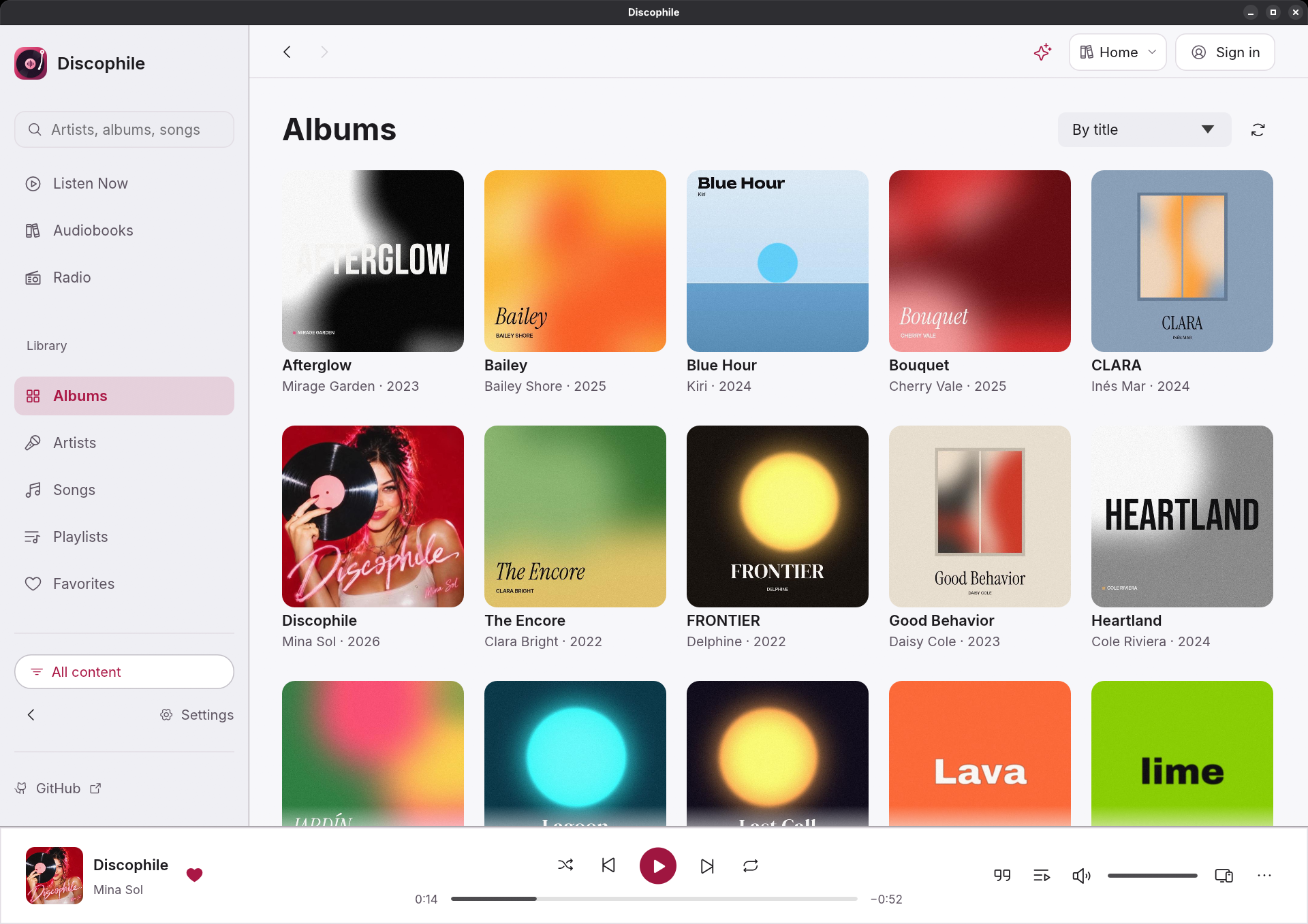
Could you use the following screenshot as the default catalog image? It was captured from Discophile 1.0.2 running on Linux and shows the application's main interface with a populated demo music library and the player visible, in the light theme.

Discophile on Linux: album library and player

Original screenshot (PNG) · WebP version

@probonopd

Copy link
Copy Markdown
Member Author

/appstream

@github-actions

github-actions Bot commented Nov 7, 2026

Copy link
Copy Markdown
Contributor

How to add AppStream metadata (and your own screenshots)

The catalog page of an application can show a description, a summary, links and, above all, screenshots of your choice. They come from an AppStream metainfo file inside the AppImage.

1. Write the file. Save it as usr/share/metainfo/<id>.metainfo.xml inside the AppDir (the directory the AppImage is made from), where <id> is the <id> of the file, e.g. io.github.yourname.YourApp:

<?xml version="1.0" encoding="UTF-8"?>
<component type="desktop-application">
  <id>io.github.yourname.YourApp</id>
  <name>YourApp</name>
  <summary>One line saying what it does</summary>
  <metadata_license>CC0-1.0</metadata_license>
  <project_license>MIT</project_license>
  <description>
    <p>A few sentences about the application.</p>
  </description>
  <launchable type="desktop-id">yourapp.desktop</launchable>
  <url type="homepage">https://github.com/yourname/YourApp</url>
  <screenshots>
    <screenshot type="default">
      <caption>The main window</caption>
      <image>https://raw.githubusercontent.com/yourname/YourApp/main/screenshots/main.png</image>
    </screenshot>
  </screenshots>
  <releases>
    <release version="1.0.0" date="2024-01-31"/>
  </releases>
</component>
  • <launchable> names the .desktop file of the AppImage.
  • The screenshot is a web address (https://…) of a PNG image that stays there, e.g. a file in your repository. The file itself does not go into the AppImage.
  • <project_license> is the license of the application, as an SPDX identifier.

2. Check it: appstreamcli validate --no-net usr/share/metainfo/<id>.metainfo.xml (from the appstream package of your distribution).

3. Put it into the AppImage.

  • appimagetool, linuxdeploy, and other tools that build from an AppDir: copy the file to AppDir/usr/share/metainfo/ before building. appimagetool checks it while building.
  • electron-builder: add it to the AppImage with extraFiles, e.g. in package.json: "linux": { "extraFiles": [ { "from": "build/<id>.metainfo.xml", "to": "usr/share/metainfo/<id>.metainfo.xml" } ] }.
  • Other tools: see https://docs.appimage.org/packaging-guide/optional/appstream.html

4. Publish a new release with the new AppImage, then comment /retest on the pull request.

Note about screenshots: the automated test still runs the application and takes a screenshot of its own. The test needs it to check that the application starts and shows a window, so the test has to pass as before. But if the AppStream metadata names a screenshot, the catalog page shows that screenshot (the one marked type="default", else the first) instead of the automated one.

@probonopd

Copy link
Copy Markdown
Member Author

Do you know why i got dark mode by default on a system that is not set to dark mode, unlike in your screenshot? Thanks.

@debba

debba commented Nov 7, 2026 •

Copy link
Copy Markdown

Nope it looks it is working on my side, but I will check better asap.
Would you be able to debug a bit?

This branch has not been deployed

No deployments
Sign up for free to join this conversation on GitHub. Already have an account? Sign in to comment

Projects

None yet

Development

Successfully merging this pull request may close these issues.

2 participants