
Make sure the following things are covered in your article before you publish your article, please read and check and kindly fix:
1. a) Cover Image: (Optional) Have you shown the cover image
Recommended size 1000px x 420px. Allowed formats are jpg and png.
Read more under the section "All About Image" in this link All about image
1. b) Introduction not followed: The article should follow any single style(In IntroExamples sub sheet) mentioned in the outline below
#For problem/solution type topics outline from here.
#For How to/Tutorials type of topics outline from here
#Some Topic/Subject to explain outline from here
There are 5 styles of Intro that you could follow, which might not be reflected in your Introduction, please follow any one style, we might ask which style you followed if it does not look right.
Introduction can be 6-7 lines with bolding important keywords and terms specially the Topic of article.
1.C) Title 60 characters: Aim for a title length of 50-60 characters, including spaces. This ensures that your title displays properly in search engine results without being cut off.
2. H2 H3 not done: H2 H3 should be used throughout the article for headings and subheadings. Please note that H1 should be only for the title of the article which you need not worry about as it's done by default by the website. Usually heading should be H2 and any subheading under that can be H3
and then H4
3. Try to make H2 H3 headings meaningful, taking important terms/keywords you will be discussing under this heading, instead of just like plain heading:
Example Plain Headings:
Step1: Preparation
Step2: Basic Multithreading
Step 3: Synchronization
Example Optimized Headings:
Step1: Preparation: Check pthreads extensions
Step2: Basic Multithreading: using pthread extensions
Step 3: Synchronization with mutexes
4. Bold and Italic not done: Use bold and italic in some places to emphasize important related keywords. Make sure important related terms are bolded throughout the article. This is very important in the Introduction and Conclusion part of the article.
5 a) Blurred Image or problem Image resolution:
Your image should be as large as this example URL below so that it appears at first glance clearly without need for users to enlarge the image
https://coderlegion.com/?qa=blob&qa_blobid=3678195348861584154
More information (size ratio etc. of image) under the section "All About Image" in this link
5 b) Images:
- Make sure images are consistent in regards to width and height in all places in article.
This will not be possible always as different section might have different style, like code screenshot can be of same width and height all places. Diagram should not match with code screenshot, but other diagram ie diagram 1 should be consitent with diagram 2. - Make sure images are compressed and made small in size before uploading to site.
- Save image name as "Topic" name as much as possible
- Give image alt name as main keyword/title of article
- Make sure image is not too large pushing the content down
- Make sure diagrams/images color combination matches is not odd colors, usually black/white/Grey colors are good candidates when creating image.
- Make sure image is not blurred so that it looks professional.
- Make sure you display 5-7 images in tutorial. Screenshots along with diagram would be nice.
6. a) Code snippets not done: Check this URL to see how to work with code snippets https://coderlegion.com/3/code-formatting-tests-in-coderlegion
Code should be shown using the code snippet { } symbol in our code editor
If you think you have shown the code snippet as an image this is appreciated, but the code should still be posted as a code snippet in the article, so that users can copy the snippet as they cannot copy code from an image.
6. b) Code snippets not rich: Make sure code snippets are rich not just 1-2 lines of snippet.
7. The length of the article is thin: Make sure the article covers all the points and adds more value than the top 3 ranking articles in Google (You can add value by showing more unique ideas, images, codes, etc). If you think this topic could not be covered more and a short article is enough then kindly choose topics in which you can write rich content.
(1) Problem/Error/Exception
Check outline from the following URL
here
(2) How to do things?
Check the outline from the following URL
here
(3) Some Topic/Subject to explain
Check the outline from the following URL
here
**If this article is about How to fix it?
#Short Intro: How this problem happens by doing what and sample code or reason that brought this problem, and how can we sort this out?
#What is the problem
# What is the cause of the problem,
# How did you reach this problem,
# Any steps to reproduce this problem,
# Any error screen message,
# Any code that produced this error,
# How can you think the user can solve this issue,
# What would be steps, any screenshots,
OR
# Intro: Why this problem and solution for it in your style in short.
# What is this problem?
# How to recreate this issue?
# Code example
# Error message, [Screenshot from your local PC]
# Explain in lines what was wrong in the code
# Solutions(Try maximum number of alternative solutions for it (Success run the Code plus Screenshot)
# Explain in lines what was corrected in the code
# Conclusion
9. a) Plagiriasm Image not uploaded or not screenshotted as expected:
Upload plagiarism image at the bottom of the article page, Read how under the section "Plagiriasm Image" at this link
https://logiclair.org/write-for-us
9. b) Plagiriasm Image not screenshotted as expected
plagiarism image is not screenshot as expected see in the following url how it is shown in the example, the entire area as shown in the screenshot should be taken
Read how under the section "Plagiriasm Image" at this link
https://logiclair.org/write-for-us
10. a) Conclusion not as expected: Make sure your article has a conclusion, at least 6-8 lines that look appealing, and bold important words. See how to do it in the “Conclusion” sub-sheet at here
10. b) Conclusion not summarizing article: Your conclusion does not summarize things like how the problem was issued and what solutions we did to solve the issue etc. It contains very generic open-ended content but not a summary of the above article's important points. Besides the conclusion should be in the past tense, which would make the sentence grammatically correct. For example changing "In this article we discuss" to "In this article we discussed"
11. Your Profile page not found or Incomplete: Please complete your profile section with your real picture this helps us to identify authors easily. This also gives trust to our readers. Profile page with Linkedin, Twitter, and GitHub are appreciated. Please fill in the About You section on the profile page. Please do not say you are a content writer. Emphasis on your programming skillsets, achievements, expertise, Interests, and hobbies. Please do this for both coderlegion.com and logiclair.org websites.
12 Markdowns not done (Preferred): Please try to include some of Our markdown divs as described in the following link to make the article rich.
https://logiclair.org/1565/markdown-divs-in-logiclair
It would have been good to have markdowns like tips, Note, Warning or FAQs
Tips:
Tips are generally used to offer helpful suggestions, best practices, or shortcuts that can improve the reader's understanding or efficiency.
Notes:
Notes typically provide supplementary information, clarification, or additional details that augment the main content.
Warnings:
Warnings are used to alert the reader about potential pitfalls, errors, or risks associated with certain practices or decisions.
13. Official reference not given :
a. Can you give atleast 2-3 "outbound link/external link." with hyperlink(in any word) in article.
b. Can you give/mention official reference for where you gained the knowledge from, Just official sites not competitors' sites like Stackoverflow or geeksforgeeks are not allowed.
c. The reference you showed does not have any mention of the topic you worked on, which means you have not dived into the official site to understand/check/visualize what it means.
d. The single reference should be mentioned only once.
For example: "https://www.selenium.dev/documentation/" is mentioned twice. It should be listed only once if it refers to the same resource.
14. Spelling/Grammer Mistakes:
Check if any in Grammarly or Word document
15 a) Will this code run if I run in IDEs?
#Make sure you upload a screenshot of one of the sample codes showing output from your PC so that we know that you have tried the code on your machine and the code is recreating the scenario as in error message(If the topic is about bug/error).
Immediately below also give the code snippet for the same code as in the screenshot so I can also paste the code in my IDE and generate the same error message.
#Please write code snippets for solutions, we will pick them and test them in our IDE and check if it's error-free and if the recommended solution will work for users.
15 b). The code is not unique:
Make sure that the code and content is unique and not adopted from Chat GPT or other websites.
15 c). The error message in the screenshot is different from the topic:
Make sure that you are working on the right error message and not trying to work on another error message as some error messages look same but are entirely different.
15 d). There are text and image versions of code:
Remove the image version if they are just the same. You can add an image version once to show you were able to replicate the error on your machine.
The next image could be to show an image of the compilation/build/run that was successful.
Moving forward the code could be in text version with code snippets.
15 e). Code screenshot not right:
The screenshot is stolen or copied from another source, not sincere work.
15 f). Code screenshot not from your own IDE:
Try to present screenshot from your own PC instead of relying on online IDE as they are not consistent
Check following image is good example of your IDE:
https://www.freecodecamp.org/news/content/images/2022/03/sss-1.png

15 g). Does any Headings need code example:
Do you think you are missing code example in any headings which has only theory explanation.
15 h). Screenshot of error message by recreating in your IDE:
Can you recreate the issue in your IDE and show one screenshot of it.
16. Comments in code itself/ or explain code in sentences after code snippet (optional):
Is it possible to give some comments in code itself so it's easy for the user to understand? Take this URL for example https://www.javatpoint.com/switch-case-with-enum-in-java
Or
You can explain the code a little after the code snippet
17. #Do you think it would be worth involving points like the following if you have not included:
Check other top-ranking blog posts if they have any additional points that you might have missed.
18. Do you think questions “ People Also Ask” from Google results could be included? You can include this in the FAQ div from the following. Don't do multiple FAQ div, but just one FAQ div, and multiple numbers of faqs could be included in the same div.
https://logiclair.org/1565/markdown-divs-in-logiclair
19. Take care of your posts under moderation by the moderator; When your post is under moderation you will see the yellow icon and when it's approved you will see it turn into a green icon, read how all this works under the section "Sharing process about the Moderation page" at this link Sharing process about the Moderation page
20.Tags: Please try to mention tags for article like "Python", "AttributeError" etc
21.How to format article: Formatting Tips
22.Looking at official documentation url provided: Make sure the sample codes in the article are not just a copied from the official documentation examples. This does not pass the google guide "Provide enough unique content"
23 (a).AI Generated Check:Make sure your content is not AI generated. We can easily detect AI content with tools and manual
23 (b).Direct Approach or Indirect Approach:The direct approach, involving the use of "you" and "I," creates a more personal and engaging tone.
Read here Checks
24.a All the topics are not problem topics: Make sure you do not say in Tutorial topic that how to solve this problem"
For Example, the topic was "How to redirect to another page in javascript on button click" and the Author said:
What is this problem?
"The challenge lies in creating a button that, upon clicking, triggers the seamless redirection to another page."
This was not necessary.
24.b Things to include in Tutorial?
A programming tutorial article should include several key elements to effectively convey information and guide readers through the learning process. Here are some essential components to consider:
a. Introduction: Provide an overview of the topic you'll be covering. Explain why it's important or useful and what readers can expect to learn from the tutorial.
b. Define Topic: Define explain about topic like for example Dictionary
c. Syntax and explanation if only required.
d. Practical example followed with example.
e. Give diagram if possible.
Some diagrams like the following in some places when you storytelling in the tutorial article will be good.
https://media.geeksforgeeks.org/wp-content/uploads/Blank-Diagram-Page-1-3.png
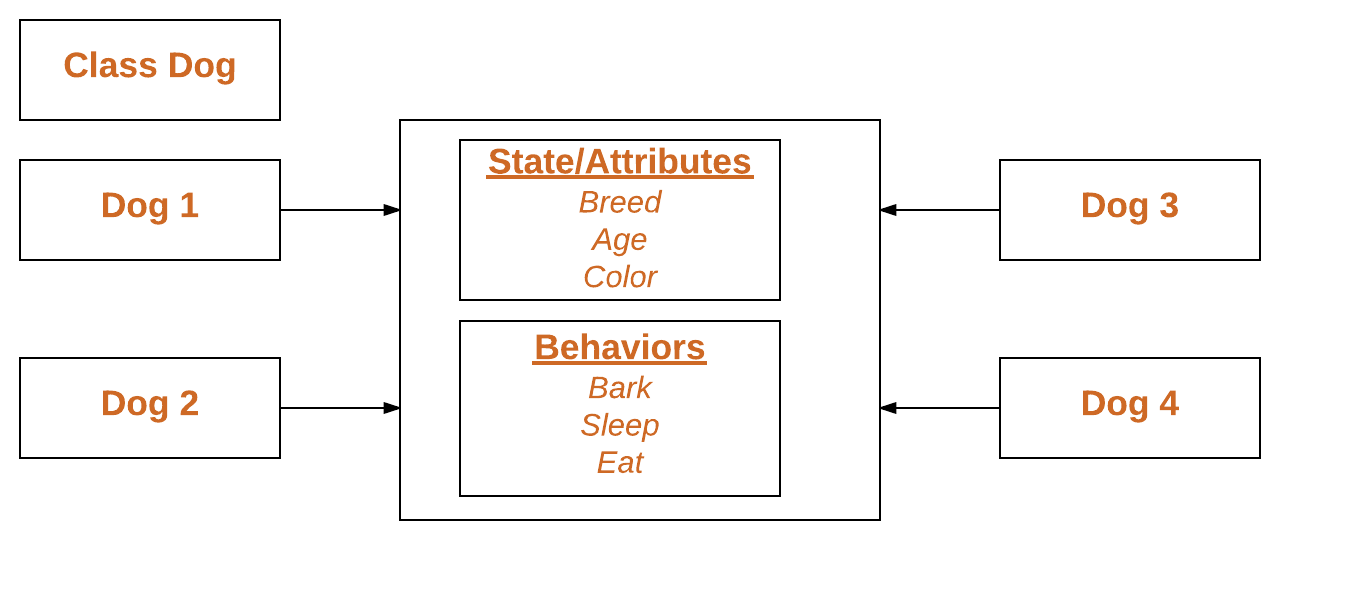
f. Step-by-Step Instructions: Break down the tutorial into manageable steps, each clearly explained and accompanied by examples or code snippets. Use a logical progression from basic to more advanced concepts.
g. Code Examples: Include plenty of code examples to illustrate the concepts you're explaining. Make sure the code is well-commented and easy to follow.
h. Explanations and Insights: Don't just show code—explain it. Help readers understand why each step is necessary and how it contributes to achieving the tutorial's goals. Provide insights, tips, and best practices along the way.
i. Visual Aids: Supplement your explanations with diagrams, charts, screenshots, or other visual aids to help clarify complex concepts or workflows.
j. Conclusion: Summarize the key takeaways from the tutorial and encourage readers to continue exploring the topic further on their own. Provide additional resources or links to related tutorials, documentation, or community forums.
k. I will encourage you to use our all divs at least once in the tutorial like tips, caution, FAQ, note.
l. Also, 2-3 images showing like the output from your screen
25.Why this problem occurs does not have bulleted reasons with H3 headings: Make sure you do so, and give meaningful headings instead of saying Reason1, Reason 2..
26.The solution for this issue does not have bulleted solutions with H3 headings: Make sure you do so, and give meaningful headings instead of saying solution1, solution 2..
27.Interlinking articles: Here's a hypothetical example to illustrate interlinking in the context of Python tutorials:
Let's say your writers are creating a series of Python tutorials covering various topics such as data structures, control flow, functions, and libraries. Interlinking in this context involves strategically linking related tutorials to provide a more comprehensive learning experience for the readers.
For instance, if one tutorial covers the basics of lists and another covers iteration and loops, you can interlink them by mentioning in the iteration tutorial that lists are commonly iterated over using loops, and provide a link to the tutorial on lists for readers who need a refresher or more in-depth understanding.
Similarly, if there's a tutorial on file handling, you could interlink it with tutorials on strings and regular expressions, since file operations often involve manipulating strings and matching patterns.
Here's a specific example of how interlinking could be done:
In the tutorial on control flow, when discussing conditional statements like if, elif, and else, you can mention that these statements are often used to make decisions based on certain conditions. You could then provide a link to the tutorial on boolean expressions and comparison operators, as a deeper understanding of these concepts would help readers grasp the logic behind conditional statements better.
In the tutorial on functions, when explaining the concept of parameters and arguments, you could link to the tutorial on data types, explaining how different data types can be passed as arguments to functions.
In the tutorial on libraries like NumPy or Pandas, you could interlink to tutorials on data manipulation and analysis, as these libraries are commonly used for such tasks.
By interlinking related tutorials in this manner, you not only help readers navigate through the topics more seamlessly but also encourage them to explore related concepts, thereby enhancing their overall understanding of Python programming.
#28# NLP(Natural Language Processing): Sprinkle NLP keywords provided into your article. This will be appear in csv-freelancer URL with bulb icon showing means that the topic has NLP to take care of.
29) Things to include in Tutorial?
A programming tutorial article should include several key elements to effectively convey information and guide readers through the learning process. Here are some essential components to consider:
1. Introduction:
a). What is this topic, give short explanation. Mention the Topic keyword in first paragraph.
b). Provide importance, usefulness and lessons to learn of the topic you'll be covering.
1)Explain why it's important or useful and
2)What readers can expect to learn from the tutorial or What you will be covering in this topic
2. Body of Article:
a. Define Topic: Define explain about topic like for example Dictionary
b. Syntax and explanation if only required.
c. Practical example followed with example.
d. Give diagram if possible.
Some diagrams like the following in some places when you storytelling in the tutorial article will be good.
https://media.geeksforgeeks.org/wp-content/uploads/Blank-Diagram-Page-1-3.png
e. Step-by-Step Instructions: Break down the tutorial into manageable steps, each clearly explained and accompanied by examples or code snippets. Use a logical progression from basic to more advanced concepts.
f. Code Examples: Include plenty of code examples to illustrate the concepts you're explaining. Make sure the code is well-commented and easy to follow.
g. Explanations and Insights: Don't just show code—explain it. Help readers understand why each step is necessary and how it contributes to achieving the tutorial's goals. Provide insights, tips, and best practices along the way.
h. Visual Aids: Supplement your explanations with diagrams, charts, screenshots, or other visual aids to help clarify complex concepts or workflows.
I. I will encourage you to use our all divs at least once in the tutorial like tips, caution, FAQ, note.
J. Also, 2-3 images showing like the output from your screen
K. Outlines check: Each points in outlines will need to be crossed off perfectly better than competitor sites.
3. Conclusion:
Summarize the key takeaways from the tutorial and encourage readers to continue exploring the topic further on their own. Provide additional resources or links to related tutorials, documentation, or community forums.