




Welcome to the most beginner-friendly open source project! 🎉
This project exists for one reason: to help YOU make your first contribution.
This is a training ground for aspiring open source contributors. By adding your name to our hall of contributors, you'll learn the entire GitHub workflow that powers millions of open source projects worldwide.
- ✅ How to fork a repository
- ✅ How to clone code to your computer
- ✅ How to create a branch
- ✅ How to make changes and commit them
- ✅ How to push code to GitHub
- ✅ How to create a Pull Request (PR)
- ✅ How to collaborate with other developers
These skills are the foundation of open source contribution. Once you complete this, you'll be ready to contribute to any project on GitHub!
What is forking? Creating your own copy of this project in your GitHub account.
- Click the "Fork" button at the top-right of this page
- Wait a few seconds while GitHub creates your copy
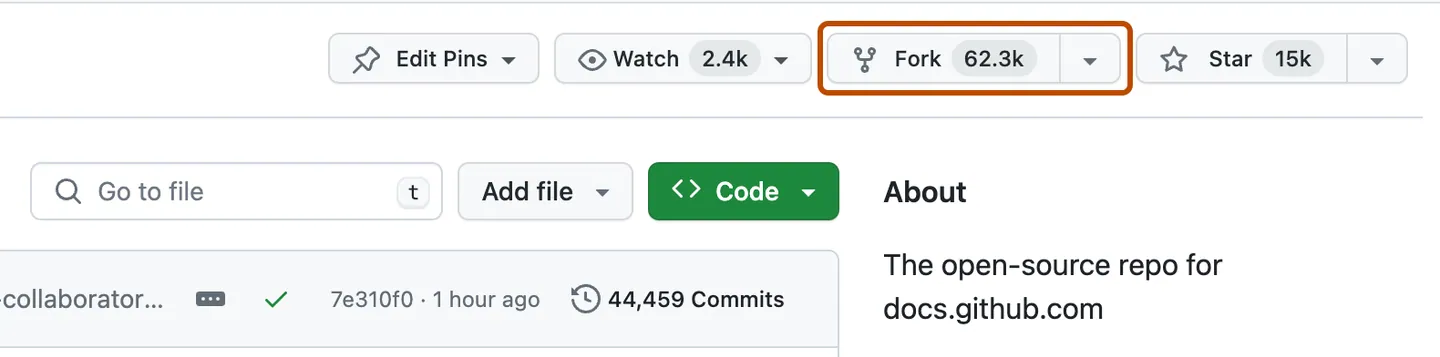
✅ Success Check: You should now be on github.com/YOUR-USERNAME/Good-first-Issue
What is cloning? Downloading the code to your computer so you can edit it.
- On your forked repository, click the green "Code" button
- Copy the URL (should look like:
https://github.com/YOUR-USERNAME/Good-first-Issue.git) - Open your terminal/command prompt
- Navigate to where you want to save the project (e.g., Desktop):
cd Desktop - Clone the repository:
git clone https://github.com/YOUR-USERNAME/Good-first-Issue.git
- Navigate into the project folder:
cd Good-first-Issue
✅ Success Check: Run ls (Mac/Linux) or dir (Windows). You should see files like README.md
What is a branch? A separate version of the code where you can make changes safely.
git checkout -b add-your-namePro Tip: Replace your-name with your actual name (e.g., add-john-doe)
✅ Success Check: You should see: Switched to a new branch 'add-your-name'
- Open
README.mdin your text editor - Scroll down to the "👥 Contributors" section
- Add your name following this exact format:
- [Aditya Singh Rathore](https://github.com/Adez017)
Example:
- [John Doe](https://github.com/johndoe)- Save the file (Ctrl+S or Cmd+S)
- Don't forget the
-at the start - Don't forget the square brackets
[]around your name - Don't forget the parentheses
()around your GitHub URL - Make sure the URL is YOUR GitHub profile (replace YOUR-USERNAME)
What is a commit? Saving your changes with a description of what you did.
-
Check what you changed:
git status
You should see
README.mdlisted in red. -
Stage your changes:
git add README.md
-
Commit with a message:
git commit -m "Add [Your Name] to contributors list"Example:
git commit -m "Add John Doe to contributors list"
✅ Success Check: You should see a message like 1 file changed, 1 insertion(+)
What is pushing? Uploading your changes from your computer back to GitHub.
git push origin add-your-nameRemember to use the branch name you created in Step 3!
✅ Success Check: You should see Branch 'add-your-name' set up to track remote branch
What is a Pull Request (PR)? Asking the project maintainer to review and accept your changes.
- Go to your forked repository on GitHub (
github.com/YOUR-USERNAME/Good-first-Issue) - You should see a yellow banner saying "Compare & pull request" - click it!
- Add a title:
Add [Your Name] to contributors - Add a description (optional but nice):
Hi! This is my first contribution to open source. I've added my name to the contributors list. Thank you for this beginner-friendly project! 🎉 - Click "Create pull request"
✅ Success Check: You should see your PR with a number (e.g., #42)
You just made your first open source contribution! 🎊
Your Pull Request will be reviewed and merged soon. Once merged, your name will appear in the contributors list on the main repository!
- A maintainer will review your PR (usually within 24-48 hours)
- They might ask for small changes (don't worry, this is normal!)
- Once approved, your PR will be merged
- Your name will officially appear on this project! 🌟
These amazing people have completed their first contribution! 🎯
Your name will appear here once your PR is merged!
❌ "Git is not recognized" or "command not found"
Solution: Git isn't installed. Download it from git-scm.com and restart your terminal.
❌ "Permission denied" when pushing
Solution: You might not have permission to push to the original repo. Make sure you:
- Forked the repository first
- Cloned YOUR fork, not the original repository
- The URL should contain YOUR username
❌ "Merge conflict" in Pull Request
Solution: Someone else added their name in the same spot. Don't panic!
- Pull the latest changes:
git pull origin main - Fix the conflicts in README.md (remove the
<<<<,====,>>>>markers) - Add and commit:
git add README.md && git commit -m "Fix merge conflict" - Push again:
git push origin add-your-name
❌ My terminal/command prompt doesn't work
Solutions:
- Windows: Use Git Bash (installed with Git) or PowerShell
- Mac: Use Terminal (find it in Applications > Utilities)
- Linux: Use your default terminal (Ctrl+Alt+T)
❌ I made a mistake in my commit
Solution: You can fix it!
- Make the correction in README.md
- Stage:
git add README.md - Amend the commit:
git commit --amend -m "Add [Your Name] to contributors list" - Force push:
git push -f origin add-your-name
- Search existing issues: Someone might have had the same problem
- Open an issue: Click "Issues" → "New Issue" and describe your problem
- Include details: What command you ran, what error you got, your operating system
We're here to help you succeed! 💪
Congratulations on your first contribution! Here's how to continue your journey:
-
Make Another Contribution
- Try adding a resource link to the "Resources" section
- Fix a typo you noticed
- Improve the documentation
-
Explore More Beginner-Friendly Projects
- First Contributions
- Awesome for Beginners
- Search GitHub for
label:"good first issue"
-
Learn More About Git & GitHub
Now that you know the workflow, you can contribute to ANY project on GitHub! Look for:
- Issues labeled
good first issue - Issues labeled
beginner-friendly - Issues labeled
help wanted
- Git Basics Video - 30 min crash course
- GitHub Docs - Official documentation
- Git Cheat Sheet - Quick reference
- How to Contribute to Open Source
- Finding Ways to Contribute
- Open Source Friday - Join the community!
- Git Branching Game - Learn by doing
- GitHub Skills - Interactive courses
- Exercism - Practice coding with mentorship
Want to help improve this project? Here are ways to contribute:
- 📝 Improve documentation clarity
- 🌍 Translate to other languages
- 🐛 Fix typos or broken links
- 💡 Suggest improvements via issues
- 🎨 Improve formatting or add helpful diagrams
- 📹 Create video tutorials
Check CONTRIBUTING.md for detailed guidelines.
We are committed to providing a welcoming and inclusive environment. Please read our Code of Conduct to understand our community standards.
In short: Be kind, be respectful, be helpful. We're all learning together! ❤️
This project is licensed under the MIT License - see the LICENSE file for details.
If this project helped you start your open source journey:
- ⭐ Star this repository (top-right corner)
- 🔗 Share it with friends learning to code
- 🐦 Tweet about your first contribution with #MyFirstPR
- 📢 Spread the word in your coding community
Join the conversation and connect with other contributors:
- Have questions? Open an Issue
- Want to discuss? Start a Discussion
- Share your success! Tag us when you share about your contribution
Made with ❤️ for beginners by beginners
Remember: Every expert was once a beginner. You've got this! 💪
⭐ Star this repo | 🔀 Fork it | 🤝 Contribute