



Lightning-fast command-line
benchmarking tool & library for Arturo


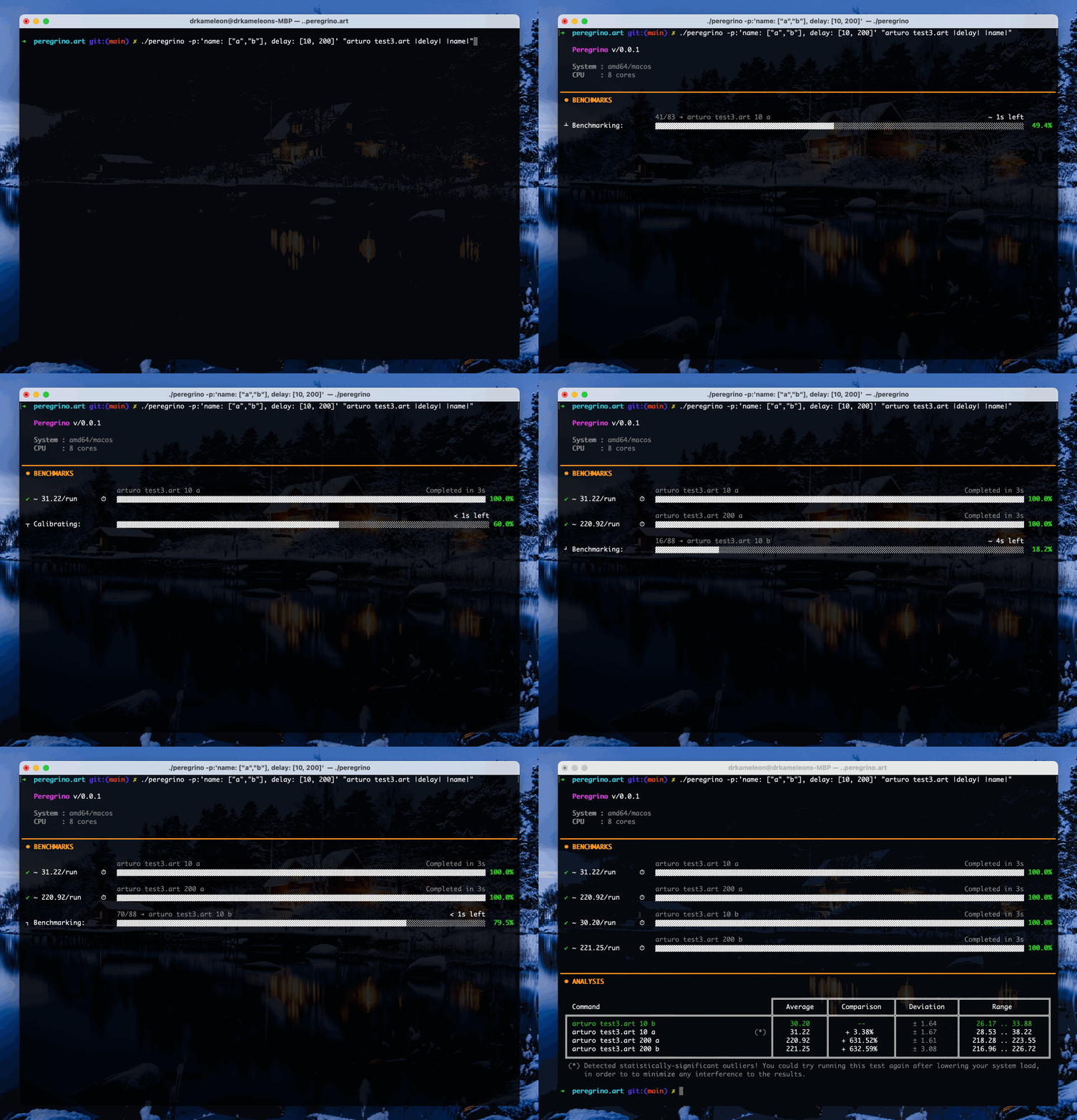
This is a benchmarker tool to help you measure and compare different scripts, in an ultra-customizeable way, see the results in an intuitive way and... even export them (Json, CSV & Markdown supported so far!) in case you want to keep them for further processing.
Note
Peregrino has shamelessly been inspired by a tool I personally love: Hyperfine. See it mostly as a double personal challenge: a) see how easily this could be done in Arturo, using what we already have, and... b) make something even better and more user-friendly!
Peregrino comes in a hybrid package; that is: you may use it as a library (via import), or you can actually run it via the command-line, after installing it.
Important
Peregrino needs one of the latest nightly builds of Arturo (anything after 0.10.0).
import {peregrino}!

P: to :peregrino @[["command one" "command two"]]!
P\benchmark ø ; and that's it!
If you want a specific number of runs (instead of letting Peregrino figure it out), just pass it to benchmark:
P\benchmark 10Or, even simpler:
peregrino ["command one" "command two"]All of the command-line options are also available as attributes, when creating a new benchmarker:
P: to :peregrino .minimal .warmup: 3 .timeout: 5000 @[["command one" "command two"]]!
P\benchmark ø.minimal,.ascii,.colorless- for the output.warmup: <times>,.timeout: <ms>,.prepare: <cmd>- for how commands are run.ignoreFailure- for commands that are expected to fail
When a command fails (or takes longer than .timeout), a commandFailed (or commandTimedOut) error is thrown - so you can catch it with try, if you want.
Once you are done benchmarking, you may also export the results: P\exportToJson "results", P\exportToCsv "results" or P\exportToMarkdown "results".
When properly installed, you should be able to run Peregrino as any normal command, directly from your terminal.
A brief preview of all the options (identical to the output of --help):
Usage:
    peregrino [options] <command>,...

Arguments:
    <command>
        One or more commands you want to benchmark

Options:
    -r, --run <times>           Specify number of times to run each command
    -f, --file                  Read commands from text file (one per line)
    -p, --params <string>       Use custom params in command
    -w, --warmup <times>        Number of warm-up runs, before benchmarking (Default: 1)
    -t, --timeout <ms>          Stop if a warm-up run takes longer than this
    -i, --ignore-failure        Ignore non-zero exit codes
        --prepare <cmd>         Command to run before each run (not measured)

    -m, --minimal               No fancy output; just the data!
    -a, --ascii                 Use simple style, with ASCII-only characters
    -c, --colorless             Don't use colored output

        --csv <file>            Export CSV to given file
        --markdown <file>       Export Markdown to given file
        --json <file>           Export Json to given file

    -h, --help                  Show this help screen
    -v, --version               Print version
Important
Arturo - and thus Peregrino - use the Nim-inspired way of parsing command-line params. Thus, for setting the --run param, you should use : before the value, e.g.:
peregrino --run:10 "some command" "another command" ...
Compare two commands - and let Peregrino figure out how many times to run each one (= as many runs as fit in ~3 seconds):
peregrino "sort data.txt" "sort -n data.txt"
Run each command exactly 20 times, after 3 warm-up runs (they are not measured, but they help with things like disk caches):
peregrino --run:20 --warmup:3 "grep -r TODO src" "rg TODO src"
Clear something before each and every run (this is not measured either):
peregrino --prepare:"rm -rf build" "make" "make -j4"
Give up on any command that takes longer than 10 seconds, instead of waiting forever:
peregrino --timeout:10000 "./slow-script.sh" "./fast-script.sh"
Benchmark a command that is expected to return a non-zero exit code (otherwise, Peregrino stops right away with an error):
peregrino -i "grep something-that-is-not-there file.txt"
Use parameters: every |name| in a command is replaced with each one of the given values (if more than one parameters are given, all possible combinations are tried):
peregrino --params:"n: [10 100 1000]" "seq |n|"
Read the commands from a file (one per line; empty lines are ignored) and export the results:
peregrino --file --json:results --markdown:results commands.txt
Here's what Peregrino does, in a nutshell:
- Calibration - first, we measure how long it takes to just spawn a shell (= the "cost" of running any command), so that we can subtract it from every single measurement afterwards. This is done once, for all commands.
- Warm-up - every command is run at least once (or
--warmuptimes), without measuring anything. This way, we make sure it actually works, let it fill any caches and get an idea of how long it takes (= how many times we should run it, if--runisn't given). During this phase, commands run in the background, so that we can keep the progress bar "alive" (and stop a command, if it hits the--timeout). - Benchmarking - every command is run as many times as needed and each run is measured.
- Analysis - for every command we get the average time, the standard deviation and the range (fastest/slowest run) + how it compares to the fastest one. If some of the runs look "weird" (e.g. because something else was running at the same time), they are marked with
(*); outliers are detected using the modified z-score (based on the median), just like Hyperfine does.
Tip
For really fast commands (= faster than spawning a shell), the results may show up as 0ms: that basically means that the command itself costs nothing compared to the shell. For really accurate results on such commands, it's better to make them do more work (e.g. run them in a loop).
MIT License
Copyright (c) 2026 Yanis Zafirópulos
Permission is hereby granted, free of charge, to any person obtaining a copy of this software and associated documentation files (the "Software"), to deal in the Software without restriction, including without limitation the rights to use, copy, modify, merge, publish, distribute, sublicense, and/or sell copies of the Software, and to permit persons to whom the Software is furnished to do so, subject to the following conditions:
The above copyright notice and this permission notice shall be included in all copies or substantial portions of the Software.
THE SOFTWARE IS PROVIDED "AS IS", WITHOUT WARRANTY OF ANY KIND, EXPRESS OR IMPLIED, INCLUDING BUT NOT LIMITED TO THE WARRANTIES OF MERCHANTABILITY, FITNESS FOR A PARTICULAR PURPOSE AND NONINFRINGEMENT. IN NO EVENT SHALL THE AUTHORS OR COPYRIGHT HOLDERS BE LIABLE FOR ANY CLAIM, DAMAGES OR OTHER LIABILITY, WHETHER IN AN ACTION OF CONTRACT, TORT OR OTHERWISE, ARISING FROM, OUT OF OR IN CONNECTION WITH THE SOFTWARE OR THE USE OR OTHER DEALINGS IN THE SOFTWARE.