🚀 What it brings: 🤖 AI co-pilot —
Explainscan output &Suggestnext commands (local-first, suggest-never-execute) · 🧭 cross-host attack plan · 🎓 Exam Mode (one toggle off for exams) · 🌐 web-augmented:onlineCVE/exploit lookups · 💸 usage & cost analytics · 🧩 stack/version-aware KB. → Full release notes
From nmap output to an actionable, port-aware recon checklist in under 30 seconds.
Offline. Self-hosted. Every engagement export-ready as Markdown.





Paste nmap text / XML / greppable output — or drag in an AutoRecon results/ zip — and every open port becomes a card with pre-filled commands (IP interpolated), HackTricks links, tickable checks, evidence screenshots, and a notes field.
Built for OSCP / HTB students and solo pentesters who currently juggle 8 browser tabs and a scratch Obsidian file per box.
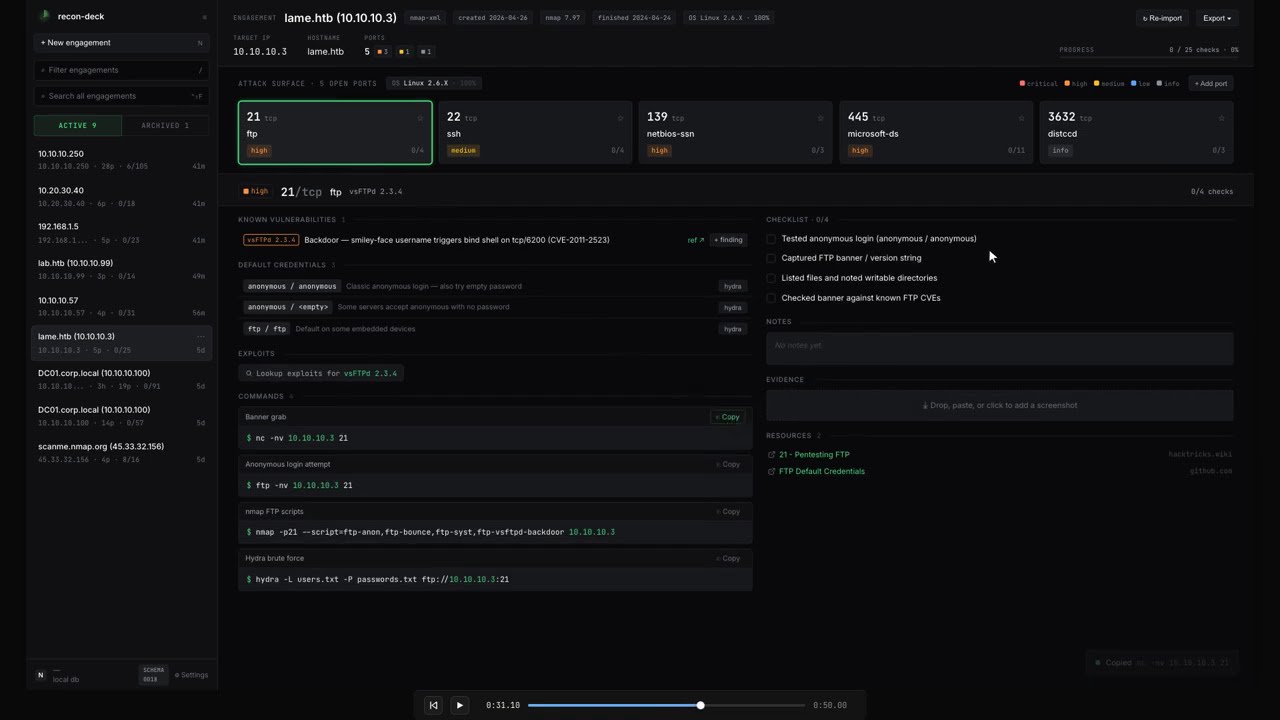
▶ Watch the 50-second demo — paste nmap → drill into a port → tick checks → switch ports.

Paste nmap → every open port becomes a KB-driven card: prefilled commands, risk colors, tickable checks. More screenshots →
# 30-second smoke test — pulls the image, starts on http://localhost:13337
curl -sSL https://raw.githubusercontent.com/kocaemre/recon-deck/main/install.sh | sh|
🤖 AI “Explain” (opt-in) Local-first co-pilot streams what a service is and what to check next — it only ever suggests, never runs. 
|
🧭 Cross-host attack plan One ordered plan across every host — which box to hit first, and why. 
|
|
💸 Bring your own model Ollama (local) · OpenAI · OpenRouter — even FREE models, with a live cost estimate. 
|
📊 Usage & cost analytics Every AI call logged with tokens + cost, per target — all local SQLite, nothing phones home. 
|
An optional, off-by-default AI co-pilot — local-first via Ollama, or any OpenAI-compatible cloud (OpenAI / OpenRouter) when you opt in.
- 🤖 AI co-pilot —
Explainscan output &Suggestnext commands (KB-grounded). Suggest-never-execute. - 🧭 Cross-host attack plan — one ordered, prioritized plan across all hosts in an engagement.
- 🎓 Exam Mode — one toggle fully disables AI for OSCP-style exams that forbid it.
- 🌐 Web-augmented Explain — optional OpenRouter
:onlinelookups for current CVEs/exploits, with an egress warning. - 💸 Usage & cost analytics — per-target token + cost ledger at
/settings/usage, all local SQLite. - 🧩 Stack/version-aware KB — e.g. Samba 3.0.x surfaces usermap / SambaCry paths automatically.
| Without it | With it |
|---|---|
| 8 browser tabs per box (HackTricks, payloadsallthethings, gtfobins, …) | One page per port, prefilled commands ready to copy |
Hand-typing nmap -p- -sV boilerplate per service |
KB-driven commands with {IP} / {HOST} / {PORT} / {WORDLIST_*} placeholders |
| Lost track of which checks you ran on box #7 | Tickable checklist + per-port notes saved in SQLite |
| Markdown report = manual copy-paste from notes | One-click export: Markdown / HTML / JSON / SysReptor / PwnDoc / PDF |
| AutoRecon dump → folder spelunking | Drop the zip, every per-port file routed to the right card |
📥 Ingest — nmap text / XML / greppable + AutoRecon zip + manual ports
- Multi-format nmap parser —
-oN,-oX,-oG. Multi-host scans become a host-selector chip in the header - AutoRecon zip import — drag the
results/folder zipped; per-port service files,_manual_commands.txt, gowitness screenshots, patterns / errors logs all routed automatically - Re-import + diff — re-paste a fresh nmap output and the heatmap badges new ports
NEWand previously-open portsCLOSED. Headerscans: Nchip tracks how many imports you've done - Manual ports — heatmap
+ Add portfor services nmap missed (DNS zone transfer, alt banners, etc.)
🎯 Triage — KB-driven port cards, known-vulns, searchsploit, findings catalog
- KB-driven cards — port + service + product/version match shipped YAML KB → tickable checks, prefilled commands, HackTricks links
- Active Directory toolkit —
nxc(netexec), impacket (GetNPUsers,GetUserSPNs,secretsdump), kerbrute, bloodhound-python, PetitPotam, pyWhisker — all wired to the right DC ports (88/135/389/445/464/636/3268/3389/5985) - Known-vulns auto-match —
vsFTPd 2.3.4and friends → vuln + CVE + ref link surfaces on the port card - searchsploit lookup — one-click
searchsploit -t "<product>"per port, cached - Findings catalog — severity / title / description / CVE / evidence refs. One-click
+ findingbutton on KB rows pre-populates the modal
🖼️ Evidence — per-port screenshots, AutoRecon gowitness import, native annotation
- Drag-drop / clipboard-paste screenshots into a per-port evidence pane
- Native HTML5 canvas annotation — Box / Arrow / Pencil / Text tools, 5-color palette, undo stack. Save chains a new evidence row via
parent_evidence_idso the original always survives - AutoRecon gowitness / aquatone PNGs auto-import into the matching port's evidence list
📤 Export — Markdown, JSON, HTML, CSV, SysReptor, PwnDoc, print-to-PDF
- Six export formats plus a print-optimised PDF route
- Markdown ships with Obsidian-compatible frontmatter
- SysReptor JSON + PwnDoc YAML for reporting-tool feeds
- Findings CSV for spreadsheet triage
- Multi-host aware — SysReptor scope and PwnDoc scope list every host; markdown / HTML render one section per host
⌨️ Workflow — command palette, FTS5 search, keyboard shortcuts, sidebar actions
- Command palette (
⌘K) — every UI action lives in the palette: add finding, re-import, settings, delete, exports, print - Cross-engagement search (
⌃⇧F) — FTS5 + BM25, hit rows show host context - Sidebar engagement actions — hover-kebab with rename / duplicate (deep-copy) / delete (shadcn AlertDialog)
- Custom commands + wordlist overrides at
/settings/commandsand/settings/wordlists— your snippets surface alongside KB commands
📚 Knowledge base — YAML KB, in-app editor, hot-reload
- YAML KB — drop entries in
/kb(or wherever you pointkb_user_dir); shipped KB lives underknowledge/ - In-app editor at
/settings/kb— paste, validate against the ZodKbEntrySchema, save under a strict filename allowlist - Hot reload —
fs.watchon shipped + user dirs flips a dirty flag, next request rebuilds. Edit a YAML in your editor, refresh, see your change - In-app editor at
/settings/kb— paste, validate, save (atomic write under a strict[A-Za-z0-9_-]filename allowlist)
🛡️ Safety — migration backup, host-header allowlist, rate limiter, offline-by-default
- Pre-migration snapshots via
VACUUM INTO— boot writesdata/recon-deck.db.backup-pre-NNNNbefore any new migration runs. Failure logs surface a copy-pasteablecprollback line - Post-migration
PRAGMA integrity_check+foreign_key_check— either failing aborts boot - Host-header allowlist middleware — defends DNS-rebinding when the app is reachable on
0.0.0.0 - Per-IP rate limiter on
/api/*— defense-in-depth for the LAN-exposure case - Offline by default — zero outbound HTTP unless the operator opts in to the GitHub release check
🚀 First-run (v2.1.0) — onboarding, sample engagement, update toast
/welcome4-step onboarding — scope · tour · local paths · updates. Seeds theapp_statesingleton with yourlocal_export_dir,kb_user_dir,wordlist_base, and the release-check toggle- Replay onboarding from
/settings → First-run— paths preserved - Sample engagement — "Try sample" on the paste panel inserts a canned 10-port HTB-easy box marked
is_sample = true. Header surfaces aSAMPLEchip + single-click Discard - Notify-only update check (opt-in) — pings
api.github.com/repos/kocaemre/recon-deck/releases/latestonce per session, toasts a "Release notes" link if a newer tag exists. Installs stay manual - Desktop-only viewport guard —
< 1280pxshows a clean "needs a wider screen" explainer
Three ways to run, pick one. All bind to 127.0.0.1:13337 (port picked to dodge the dev-server crowd on 3000/8080), so nothing leaks to your LAN by default; see Exposing to LAN if you need otherwise.
1. One-liner (auto-pulls + starts + opens browser):
curl -sSL https://raw.githubusercontent.com/kocaemre/recon-deck/main/install.sh | sh2. Docker Compose (recommended for persistent setups):
curl -O https://raw.githubusercontent.com/kocaemre/recon-deck/main/docker-compose.yml
docker compose up -d
3. Manual docker run:
docker run -d --name recon-deck -p 127.0.0.1:13337:13337 \
  -v recondeck-data:/data \
  -v recondeck-kb:/kb \
  -e HOSTNAME=0.0.0.0 \
  ghcr.io/kocaemre/recon-deck
Open http://localhost:13337, paste nmap output, see cards. The -p 127.0.0.1:13337:13337 host-side prefix keeps the app loopback-only — see Exposing to LAN for LAN reachability.
Stable is the default. To try the newest pre-release build (new features land here first; may be unstable):
# One-liner
curl -sSL https://raw.githubusercontent.com/kocaemre/recon-deck/main/install.sh | sh -s -- --beta

# or pull the beta image directly
docker pull ghcr.io/kocaemre/recon-deck:beta
Image tags: :latest and :X.Y.Z are stable; :beta always points at the newest pre-release, and each beta is also pinned at :X.Y.Z-beta.N. Switch back to stable any time with --stable (or pull :latest). To have the in-app update toast track betas, set RECON_UPDATE_CHANNEL=beta (otherwise it only ever surfaces stable releases).
For OSCP/HTB students and solo pentesters. Offline by default. Does not run scans — it complements AutoRecon and HackTricks. Think of it as the OSCP-flavored Obsidian for recon: same category as Obsidian, focused on post-scan workflow. An optional, off-by-default AI co-pilot (local-first via Ollama; OpenAI/OpenRouter only if you opt in) can explain scan output and suggest commands — with it disabled (the default) nothing leaves your machine, and Exam Mode turns it off with one switch for exams that forbid AI.
It is NOT a reporting platform, a team tool, a scanner, or a mobile app — and it never runs commands for you (the AI co-pilot only suggests; you run things yourself). The intent is deliberate and narrow — see ROADMAP.md for the out-of-scope list.
By default, the Quick Start binds to 127.0.0.1 on the host — only your local machine can reach the app. To make recon-deck reachable from another machine on your LAN:
docker run -p 13337:13337 \
  -v recondeck-data:/data \
  -v recondeck-kb:/kb \
  -e HOSTNAME=0.0.0.0 \
  -e RECON_DECK_TRUSTED_HOSTS=192.168.1.10:13337 \
  ghcr.io/kocaemre/recon-deck
Replace 192.168.1.10:13337 with the host:port your LAN clients will use. RECON_DECK_TRUSTED_HOSTS is comma-separated — expand it for every additional host you want to reach the app from.
This activates the host-header allowlist (mitigates DNS rebinding). Requests whose Host: header is not in the allowlist are rejected with HTTP 421 Misdirected Request. See SECURITY.md for the full threat model.
Drop YAML files into /kb/ports/*.yaml (volume-mounted) — they override shipped entries with the same port/service at startup. Schema, denylist, and placeholder syntax in CONTRIBUTING.md.
Bind-mounting a host dir? Container runs as UID 1000 — chown 1000:1000 /path/to/my-kb first, or use a named volume (-v recondeck-kb:/kb) which inherits ownership automatically.
autorecon <target>→ producesresults/<ip>/cd results && zip -r my-target.zip <ip>/- Drag the zip onto the import panel
Server-side unzip routes everything: per-port files (tcp80/…, tcp_22_ssh_*) into the right card, _manual_commands.txt into Manual commands, gowitness/aquatone PNGs into port evidence, log files (_patterns, _errors, _commands) into an engagement warning panel. Multi-IP zips become multi-host engagements (primary inherits full AR data, secondaries get ports + scripts).
One engagement, N hosts (DC + workstations, related boxes, etc.). Hosts chip-switch in the header; heatmap + commands + palette all rescope. Multi-host is detected from XML <host> blocks, text/greppable Nmap scan report for ... boundaries, and AutoRecon multi-IP zips.
Hit Re-import in the engagement header and paste a fresh nmap output. The reconciler:
- Adds new ports (
NEWchip on the heatmap) - Refreshes
last_seen_scan_idfor re-observed ports - Marks ports the new scan didn't see as
closed(CLOSEDchip, dim tile) - Surfaces a
scans: Nchip in the header so you know multi-import diff context applies - Toast:
1 new · 1 closed · 2 unchangedafter import
/settings (footer link in the sidebar) covers:
- Engagement list — inline delete with cascade confirmation
- Wordlists (
/settings/wordlists) — override{WORDLIST_*}placeholders - Custom commands (
/settings/commands) — personal snippets alongside KB commands, scopable by service/port - KB editor (
/settings/kb) — paste, validate, save to your user dir; cache invalidates immediately
Engagement renames are inline on the header (target identity) or via the sidebar kebab (display label). The kebab also exposes Duplicate (deep-copy transaction) and Delete (cascade with confirmation).
Six formats + a print route. All multi-host aware.
| Format | Use |
|---|---|
| Markdown | Obsidian-compatible frontmatter, paste into your vault |
| JSON | Structured dump for scripting |
| HTML | Standalone single-file report, opens offline |
| Findings CSV | Severity / host / port / CVE rows for spreadsheets |
| SysReptor JSON | projects/v1 shape with scope[] |
| PwnDoc YAML | Findings + scope, multi-host aware |
| Print-to-PDF | /report route, Ctrl+P → Save as PDF |
State lives in two volumes — back both up together:
recondeck-data→ SQLite DB (history, evidence, findings, notes)recondeck-kb→ your YAML overrides under/kb
Snapshot to tarball:
docker stop recon-deck
docker run --rm -v recondeck-data:/data -v recondeck-kb:/kb -v "$(pwd)":/out \
  alpine sh -c 'tar -C / -czf /out/recon-deck-$(date +%F).tar.gz data kb'
docker start recon-deck
Restore: stop + rm container, recreate volumes, tar -xzf from inside an alpine container, restart. Migrations re-apply on boot. Pin a specific image tag (ghcr.io/kocaemre/recon-deck:v2.1) for production restores so a :latest jump doesn't surprise you.
Boot also takes a VACUUM INTO 'data/recon-deck.db.backup-pre-NNNN' snapshot before running pending migrations; on failure the log prints a copy-pasteable rollback line. Schema is forward-only — see CONTRIBUTING.md › "Migration safety and recovery" for the full procedure.
Notify-only — no auto-update, no telemetry. Optional release check is opt-in at /settings → First-run.
Docker (easy): the install one-liner is idempotent — re-run it to upgrade. It pulls the new image, removes the prior container (named volumes survive), and starts fresh:
curl -sSL https://raw.githubusercontent.com/kocaemre/recon-deck/main/install.sh | shDocker (manual):
docker pull ghcr.io/kocaemre/recon-deck:latest
docker stop recon-deck && docker rm recon-deck
# re-run docker run from Quick Start; named volumes survive
Beta: updating a beta install works the same way — re-run the --beta
one-liner (idempotent: pulls the newest :beta, replaces the container, volumes
survive), or pull the image and re-run manually:
# easy — re-run to pull the latest pre-release
curl -sSL https://raw.githubusercontent.com/kocaemre/recon-deck/main/install.sh | sh -s -- --beta

# manual
docker pull ghcr.io/kocaemre/recon-deck:beta
docker stop recon-deck && docker rm recon-deck   # named volumes survive
# re-run docker run with the :beta image
On a busy port, the RECON_DECK_PORT env goes on the sh side of the pipe:
… | RECON_DECK_PORT=13338 sh -s -- --beta.
Local dev: git pull && npm install && npm run dev. Migrations apply at boot.
There are two channels and they never touch each other. Which one you're on is
decided per install.sh run (the --beta flag), not baked into the image —
re-running with a different flag switches you:
| Channel | Pull command | Docker tags it tracks |
|---|---|---|
| Stable (default) | … | sh |
:latest, :X.Y.Z, :X.Y, :X |
| Beta (pre-release) | … | sh -s -- --beta |
:beta, and each build pinned at :X.Y.Z-beta.N |
A stable release never moves :beta; a beta build never moves :latest or the
short :X.Y / :X tags. Promotion to stable is just a clean (non-pre-release)
version tag — the same build that was on :beta becomes :latest.
Stable → beta — safe. Re-run with --beta; your data volumes are reused:
curl -sSL https://raw.githubusercontent.com/kocaemre/recon-deck/main/install.sh | sh -s -- --betaBeta → stable — re-run without the flag (or --stable):
curl -sSL https://raw.githubusercontent.com/kocaemre/recon-deck/main/install.sh | sh
⚠️ Downgrade caveat. Database migrations are forward-only. If the beta you were running advanced the schema past the stable image's schema (the Schema badge at the top of this README is the current number), the older stable image won't understand the on-disk DB and can fail to boot. Going back a channel is only safe when both images share the same schema version. Back up the data volume first (see Backup & Restore) before downgrading across a schema bump. Moving forward (stable → beta, or up to a newer stable) is always fine.
To have the in-app update toast track betas instead of only stable releases,
set RECON_UPDATE_CHANNEL=beta (notify-only — it never installs anything).
| Layer | Technology |
|---|---|
| Framework | Next.js 15.5 (App Router) |
| UI | React 19, Tailwind 4, shadcn/ui |
| Persistence | SQLite via Drizzle + better-sqlite3 |
| Parsers | fast-xml-parser (XML), custom regex (text) |
| KB format | YAML via js-yaml, validated by Zod |
| Container | node:22-alpine, multi-stage build |
| License | MIT |
Full version pins live in package.json. The image is a single multi-stage node:22-alpine build — typical pulled size is under ~200 MB.
For local hacking outside the container:
git clone https://github.com/kocaemre/recon-deck
cd recon-deck
npm install
npm run dev
# → http://localhost:13337
Useful scripts:
npm test              # vitest unit tests (parsers + KB schema)
npm run lint:kb       # YAML lint (schema + denylist + URL scheme)
npm run typecheck     # tsc --noEmit
npm run build # production build (output: "standalone")| Env var | Default | Purpose |
|---|---|---|
HOSTNAME |
127.0.0.1 |
Bind address inside the container. Override to 0.0.0.0 for port-map reach. |
PORT |
13337 |
Port the app listens on (also drives the host-header allowlist default). |
RECON_DB_PATH |
/data/recon-deck.db |
SQLite file location. Keep on a mounted volume for persistence. |
RECON_KB_USER_DIR |
/kb |
User KB directory. Onboarding writes this to app_state.kb_user_dir which takes precedence; env var is the fallback. |
RECON_LOCAL_EXPORT_DIR |
(empty) | Engagement header's vscode://file/… link. app_state.local_export_dir wins; this and NEXT_PUBLIC_RECON_LOCAL_EXPORT_DIR are fallbacks. |
RECON_DECK_TRUSTED_HOSTS |
(empty) | Comma-separated extra hosts allowed by the host-header middleware. |
NEXT_TELEMETRY_DISABLED |
1 |
Disables Next.js telemetry. Preserves the offline guarantee. |
See CONTRIBUTING.md for KB rules, PR discipline, and what's in/out of scope.
See SECURITY.md for the threat model, offline guarantee, and default-deny postures.
See CREDITS.md for upstream attribution — HackTricks, AutoRecon, PayloadsAllTheThings, SecLists.
See ROADMAP.md for upcoming candidates, the v2.x future direction, and hard out-of-scope items.
MIT.