Repository navigation
en plugin dev components tool
LangBot's built-in Local Agent calls tools to interact with the outside world during execution. Currently, adding tools is supported through both plugins and MCP.
A single plugin can contain any number of tools. Execute the command lbp comp Tool in the plugin directory and follow the prompts to enter the tool configuration.
➜  HelloPlugin > lbp comp Tool
Generating component Tool...
Tool name: get_weather_alerts
Tool description: Get weather alerts for a US state.
Component Tool generated successfully.
组件 Tool 生成成功。
This will generate get_weather_alerts.yaml and get_weather_alerts.py files in the components/tools/ directory. The .yaml file defines the basic information for the tool, and the .py file is the tool handler:
➜  HelloPlugin > tree
...
├── components
│   ├── __init__.py
│   └── tools
│       ├── __init__.py
│       ├── get_weather_alerts.py
│       └── get_weather_alerts.yaml
...apiVersion: v1 # Do not modify
kind: Tool # Do not modify
metadata:
name: get_weather_alerts # Tool name, for LLM recognition
label:
en_US: GetWeatherAlerts # Tool display name, shown in LangBot UI, supports multilingual
zh_Hans: GetWeatherAlerts
description:
en_US: 'Get weather alerts for a US state.' # Tool description, shown in LangBot UI, supports multilingual. Optional
zh_Hans: '获取美国某个州的天气预警'
spec:
parameters: [] # Tool parameters, values generated by LLM based on conversation context
llm_prompt: 'Get weather alerts for a US state.' # Tool prompt, for LLM to determine whether to call this tool
execution:
python:
path: get_weather_alerts.py # Tool handler, do not modify
attr: GetWeatherAlerts # Tool handler class name, matches the class name in get_weather_alerts.pyThe following code is generated by default (components/tools/<tool_name>.py). You need to implement the calling and return logic for this tool in the call method of the GetWeatherAlerts class.
# Auto generated by LangBot Plugin SDK.
# Please refer to https://langbot.app/docs/en/plugin/dev/tutor.html for more details.
from __future__ import annotations

from typing import Any

from langbot_plugin.api.definition.components.tool.tool import Tool
from langbot_plugin.api.entities.builtin.provider import session as provider_session

class GetWeatherAlerts(Tool):

    async def call(self, params: dict[str, Any], session: provider_session.Session, query_id: int) -> str:
        """Fill your tool code here"""
        return {}
In the call method, implement this tool:
Note
The weather retrieval tool example comes from MCP's Server Writing Example.
from __future__ import annotations

from typing import Any

from langbot_plugin.api.definition.components.tool.tool import Tool
from langbot_plugin.api.entities.builtin.provider import session as provider_session
import httpx

# Constants
NWS_API_BASE = "https://api.weather.gov"
USER_AGENT = "weather-app/1.0"

async def make_nws_request(url: str) -> dict[str, Any] | None:
    """Make a request to the NWS API with proper error handling."""
    headers = {
        "User-Agent": USER_AGENT,
        "Accept": "application/geo+json"
    }
    async with httpx.AsyncClient() as client:
        try:
            response = await client.get(url, headers=headers, timeout=30.0)
            response.raise_for_status()
            return response.json()
        except Exception:
            return None

def format_alert(feature: dict) -> str:
    """Format an alert feature into a readable string."""
    props = feature["properties"]
    return f"""
Event: {props.get('event', 'Unknown')}
Area: {props.get('areaDesc', 'Unknown')}
Severity: {props.get('severity', 'Unknown')}
Description: {props.get('description', 'No description available')}
Instructions: {props.get('instruction', 'No specific instructions provided')}
"""

class GetWeatherAlerts(Tool):

    async def call(self, params: dict[str, Any], session: provider_session.Session, query_id: int) -> str:
        """Fill your tool code here"""
        state = params.get("state", "CA")

        url = f"{NWS_API_BASE}/alerts/active/area/{state}"
        data = await make_nws_request(url)

        if not data or "features" not in data:
            return "Unable to fetch alerts or no alerts found."

        if not data["features"]:
            return "No active alerts for this state."

        alerts = [format_alert(feature) for feature in data["features"]]
        return "\n---\n".join(alerts)
In this tool, we need to get the state parameter from params and call the NWS API to get weather alerts for that state, so we need to define the state parameter in the parameters of the manifest file.
The parameters format follows JSON Schema, is supported by OpenAI Function Calling feature, and its root type is fixed as type: object. Please add parameters in properties and add required parameter descriptions in required.
...
spec:
  parameters:
    type: object  # Do not modify
    properties:  # Do not modify, add parameters here
      state:
        type: string
        description: 'Two-letter US state code (e.g. CA, NY)'
    required:  # Add required parameter descriptions here
      - state
...
This tool also uses the httpx library, so we need to add the httpx dependency in requirements.txt in the plugin directory.
# HelloPlugin/requirements.txt
langbot-plugin  # Already exists by default
httpx
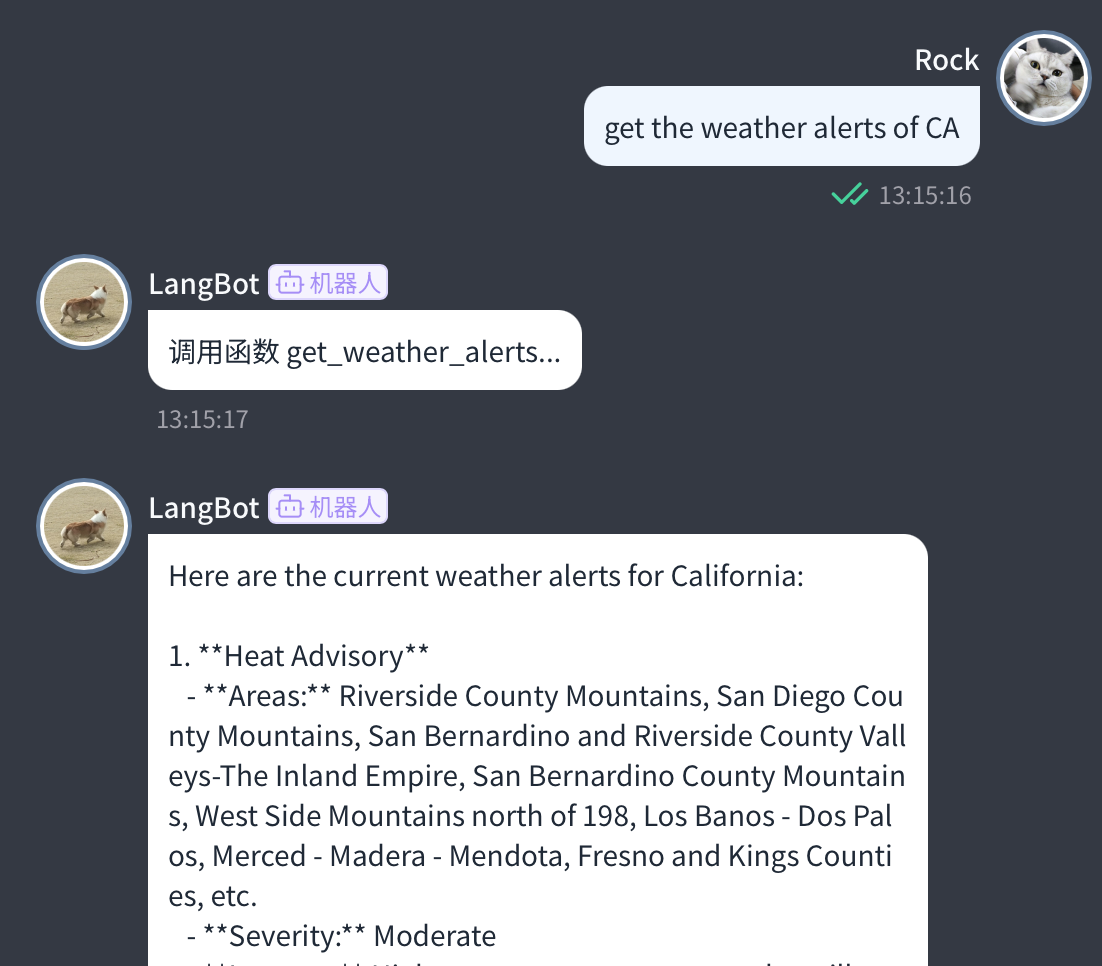
Now execute the command lbp run in the plugin directory to start debugging. Configure a model that supports tool calling in LangBot and select to use that model on the corresponding pipeline to use this tool.
A single Tool is called by several processors and conversations (one event can trigger several plugin processors):
- Read config per call (
self.get_plugin_config()orctx.config); never read it ininitialize()and cache it on the instance. - Never leave call arguments, results or conversation data on instance fields or module-level variables; take the conversation identity from the current call's
session/query_id. - Concurrent calls share the same instance, so instance fields get interleaved writes. Data that must survive calls belongs in Host storage, keyed with the corresponding processor or conversation identity.
- If you keep per-installation process-local caches, release them in
on_installation_revoked(binding).
See Certified plugins and shared runtime for the full specification.
You have learned the basic usage of tools. Next, you can:
- See how Tool receives
sessionandquery_id. - Check out Plugin Common APIs